
Download PrimoPDF – PDF converter, PDF creation, print to PDF, document conversion, free PDF tool
Overview
PrimoPDF is a free, high-quality PDF conversion tool developed by Nitro Software, Inc., designed to streamline the process of creating PDF files from any Windows application. The app functions as a virtual printer, enabling users to generate PDFs by selecting “Print to PrimoPDF” from any compatible software, including word processors, web browsers, and design tools. This capability makes it an essential utility for professionals, students, and office workers who frequently need to convert documents into universally accessible PDF format.
PrimoPDF addresses common challenges related to document sharing, archiving, and compatibility across platforms. By standardizing file formats, it ensures that recipients view documents exactly as intended, regardless of their operating system or software. The app is particularly valuable in environments where document integrity and consistency are critical, such as legal, academic, and corporate settings.
Although the developer did not provide additional technical details about the app’s background or development history, its long-standing presence in the productivity space suggests reliability and stability. The software is tailored for users seeking a lightweight, no-frills solution to PDF creation without the complexity of full-featured PDF editors. Its focus on core functionality—converting documents to PDF—positions it as a dependable tool in the digital workflow ecosystem.
Key Features & Functionality
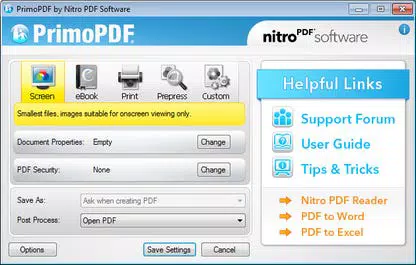
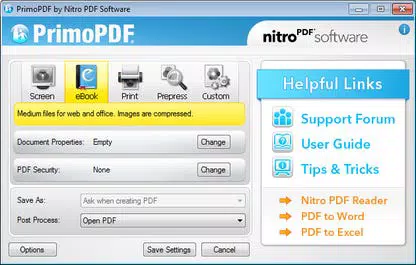
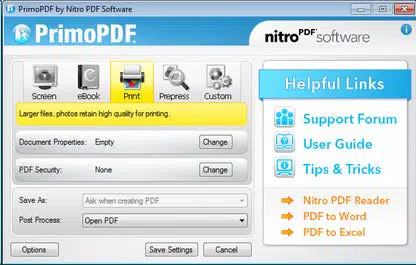
- PDF Optimization – Users can tailor PDF output for specific purposes, such as screen viewing, printing, e-books, or prepress. This ensures that files are optimized for quality, file size, and compatibility, reducing load times and enhancing readability across devices.
- Secure PDF Files – The app supports 128-bit encryption, allowing users to password-protect sensitive documents. This feature is especially useful when sharing confidential reports, contracts, or personal data.
- Document Information Addition – Users can embed metadata such as title, author, subject, and keywords into PDFs. This improves document organization and enables efficient searchability within file systems and cloud storage.
- Full 64-bit Support – PrimoPDF is built to run efficiently on modern 64-bit Windows systems, ensuring compatibility with current hardware and operating environments.
- Improved PDF Output – The app delivers enhanced rendering of text, including support for double-byte characters and non-TrueType fonts. This results in more accurate and professional-looking PDFs, especially for multilingual or specialized content.
For example, a university student can use PrimoPDF to convert a research paper into a secure, searchable PDF with proper metadata before submitting it. Similarly, a small business owner might generate a client proposal with optimized print settings and password protection to prevent unauthorized access.
Interface, UX & Performance
PrimoPDF features a minimalistic interface that integrates seamlessly into the Windows printing system. Users interact with it through the standard print dialog, making the learning curve nearly nonexistent. The app does not require a separate window or dashboard, which contributes to its lightweight footprint and fast execution.
Navigating the app is straightforward: users simply select “PrimoPDF” as the printer destination, configure output settings if needed, and save the file. This streamlined workflow enhances productivity by eliminating unnecessary steps. Although the developer did not list formal performance metrics, the app’s 15.7 MB size suggests efficient resource usage, and its integration with the OS indicates stable operation during routine tasks.
Performance is expected to be consistent across various device categories, including desktops and laptops, due to its native Windows integration and low system requirements. Responsiveness is likely to be high, as the app does not run background processes or require constant updates. Stability appears strong, given its long release history and continued availability without reported widespread issues.
Platform Compatibility & Technical Requirements
PrimoPDF is designed exclusively for the Windows platform, making it compatible with Windows-based desktop and laptop systems. The app requires no additional software installation beyond the standard Windows environment, and it supports 64-bit machines, ensuring performance on modern hardware.
The file size is 15.7 MB, which is relatively small, indicating a compact and efficient application. The version is listed as 1.0, and the release date is March 12, 2014. While the developer did not specify minimum OS requirements, the app’s compatibility with 64-bit systems suggests it runs on Windows 7 and later versions. Specific requirements were not listed, so users should ensure their system meets general Windows compatibility standards.
Pros and Cons
Pros
- Free to download and use with no hidden costs
- Simple, intuitive interface integrated into Windows print system
- Supports 64-bit systems for modern performance
- Offers PDF optimization for different use cases
- Includes security features like 128-bit encryption
- Enables metadata addition for better document management
Cons
- Available only for Windows, not for mobile or macOS
- No visible update history or recent maintenance indicators
- Interface is minimal, lacking advanced editing tools
- Does not support batch processing or automation
- No built-in PDF editing or annotation features
FAQ
Is PrimoPDF safe to download and install?
Yes, PrimoPDF is a legitimate tool developed by Nitro Software, Inc. It is free from malware and does not include bundled software. Users should download it from official or trusted sources to ensure security.
Can I use PrimoPDF on my mobile device?
No, PrimoPDF is designed exclusively for Windows desktop and laptop systems. It is not available for Android, iOS, or other mobile platforms.
Does PrimoPDF support batch conversion?
Based on available information, PrimoPDF does not support batch processing. Each document must be converted individually through the print function.
Is PrimoPDF still being updated?
The app’s last release was in 2014, and the developer has not provided recent update information. While it remains functional, users should be aware that it may not receive future improvements or security patches.
Can I edit PDFs created with PrimoPDF?
PrimoPDF is a conversion tool only. It does not include editing, annotating, or modifying features. For PDF editing, users will need a separate application.
Final Thoughts
PrimoPDF remains a reliable, lightweight solution for users who need to convert documents into PDF format quickly and securely. Its core strengths—simplicity, security, and compatibility—make it ideal for individuals and organizations that prioritize efficiency and document integrity. While it lacks modern features like batch processing or mobile access, its focused functionality delivers consistent results without unnecessary complexity.
For anyone using Windows and seeking a free, no-frills PDF converter, PrimoPDF continues to offer solid value. It’s particularly well-suited for students, professionals, and small teams who require straightforward document conversion without the overhead of a full-featured PDF editor.
Download PrimoPDF now


